



















Best viewed using:
Internet Explorer
or
Mozilla Firefox


Connecting the N8038 Early-era Alternating Flasher Simulator
Installing the N8038 is very straightforward. Because the module has circuitry on both sides, care must be taken to be sure that the components or wires soldered will not make contact with any metal object which could cause a short circuit.
Included with the module are two 6” lengths of #32 insulated wire. If necessary, these can be used for power input wires. If used, we recommend the blue wire be used for the + DC connection. It would be connected to solder point 1 as shown in Fig. 1. This wire could also connect through a switch to the + DC connection for remote control of the lighting effect. The other (green) wire should be connected to – DC and to solder point 2.
Any well regulated DC power source can be used to power this module providing the voltage is at least 6VDC and doesn't exceed 18VDC. Our N3512 and N3518 Power supplies are ideal for this use. Also, due to the very low power consumption, this device can also be powered by a battery, such as a standard 9-volt.
Important note: A low-wattage iron with a pointed tip should be used for connection of wires. Too much heat or solder can easily damage the wires or module and void the warranty.
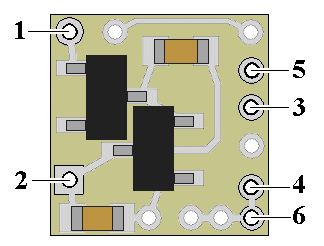
Figure 1
Also, all connecting wires should be pre-tinned before soldering them to the module. This will make connection quick and easy and ensure excessive heat is not applied to the solder points.
Connecting LEDs
When connecting the LEDs, proper polarity must be observed. LEDs are “polarity sensitive” and will not function if connected backwards. The N8038 is configured for the connection of up to four 20 ma red or yellow (or mixture of) LEDs with device voltages of 1.85-2.0 VDC. One LED (or series pair) is to be connected to solder points 3 & 4, and the other LED (or series pair) is to be connected to solder points 5 & 6. This covers all of Ngineering’s Micro and Nano yellow and red LEDs, as well as many of the yellow and red LEDs available. The N8038 has on-board current limiting resistance to protect these LEDs so no external resistor is required.
Using wire appropriate for the size of the LED and its placement in the modeling project, connect the one LED cathode (the – connection) to point 3 on the module and its anode (the +) to solder point 4. Connect the other LED cathode (-) to solder point 5, and its anode (+) to point 6. See Fig. 2 below for a schematic layout of LED hookup.
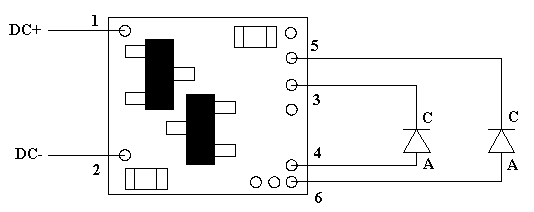
Figure 2
If you want to use two pair of LEDs, the schematic layout in Fig. 3, below shows correct LED hookup.
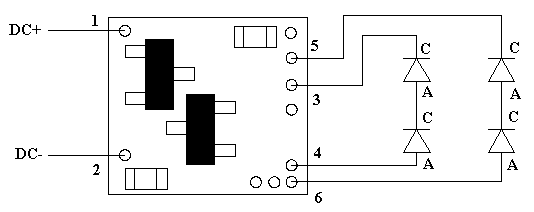
Figure 3
When using a series-wired pair of LEDs, the individual intensity (brightness) of these LEDs will be slightly lower than that of a single LED connected to the same solder points.
Once again, be sure to use a low-wattage soldering iron when connecting wires to the module.
This completes hookup of our N8038 Early-era Alternating Flasher module. We hope the added realism it provides enhances your enjoyment of the hobby.
© 2008 Ngineering